

 About Us
Attack Paths is currently available for AWS providers. Support for
additional providers is planned.
Prerequisites
The following prerequisites are required for Attack Paths:- An AWS provider is configured with valid credentials in Prowler App. For setup instructions, see Getting Started with AWS.
- At least one scan has completed on the configured AWS provider. Attack Paths scans run automatically alongside regular security scans — no separate configuration is required.
How Attack Paths Scans Work
Attack Paths scans are generated automatically when a security scan runs on an AWS provider. Each completed scan produces graph data that maps relationships between IAM principals, policies, trust configurations, and other resources. Once the scan finishes and the graph data is ready, the scan appears in the Attack Paths scan table with a Completed status. Scans that are still processing display as Executing or Scheduled.Since Prowler scans all configured providers every 24 hours by default,
Attack Paths data stays up to date automatically.
Accessing Attack Paths
To open Attack Paths, click Attack Paths in the left navigation menu.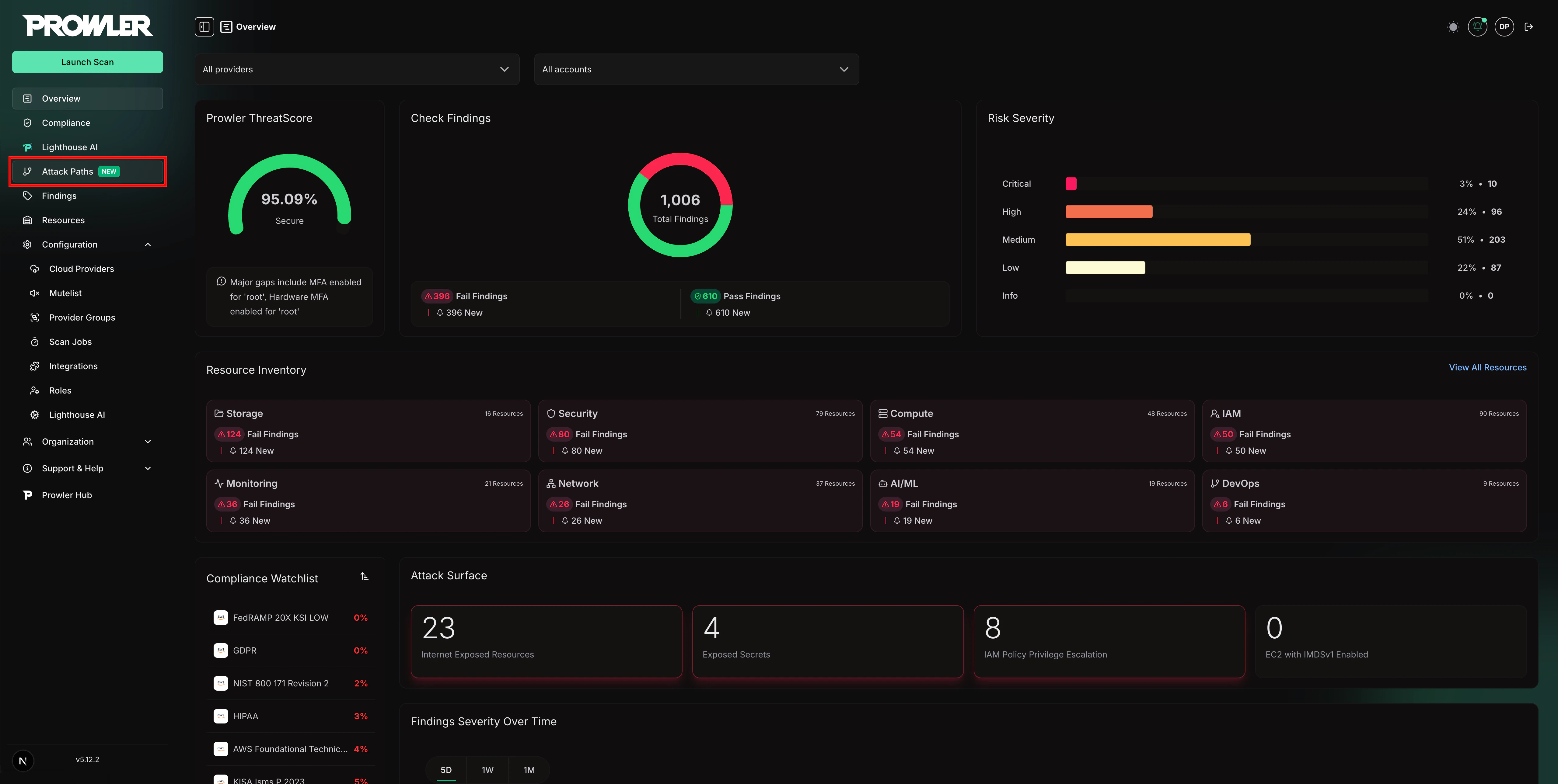
- Left panel: A table listing all available Attack Paths scans
- Right panel: The query selector, parameter form, and execute controls
Selecting a Scan
The scans table displays all Attack Paths scans with the following columns:- Provider / Account: The AWS provider alias and account identifier
- Last scan date: When the scan completed
- Status: Current state of the scan (Completed, Executing, Scheduled, or Failed)
- Progress: Completion percentage for in-progress scans
- Duration: Total scan time
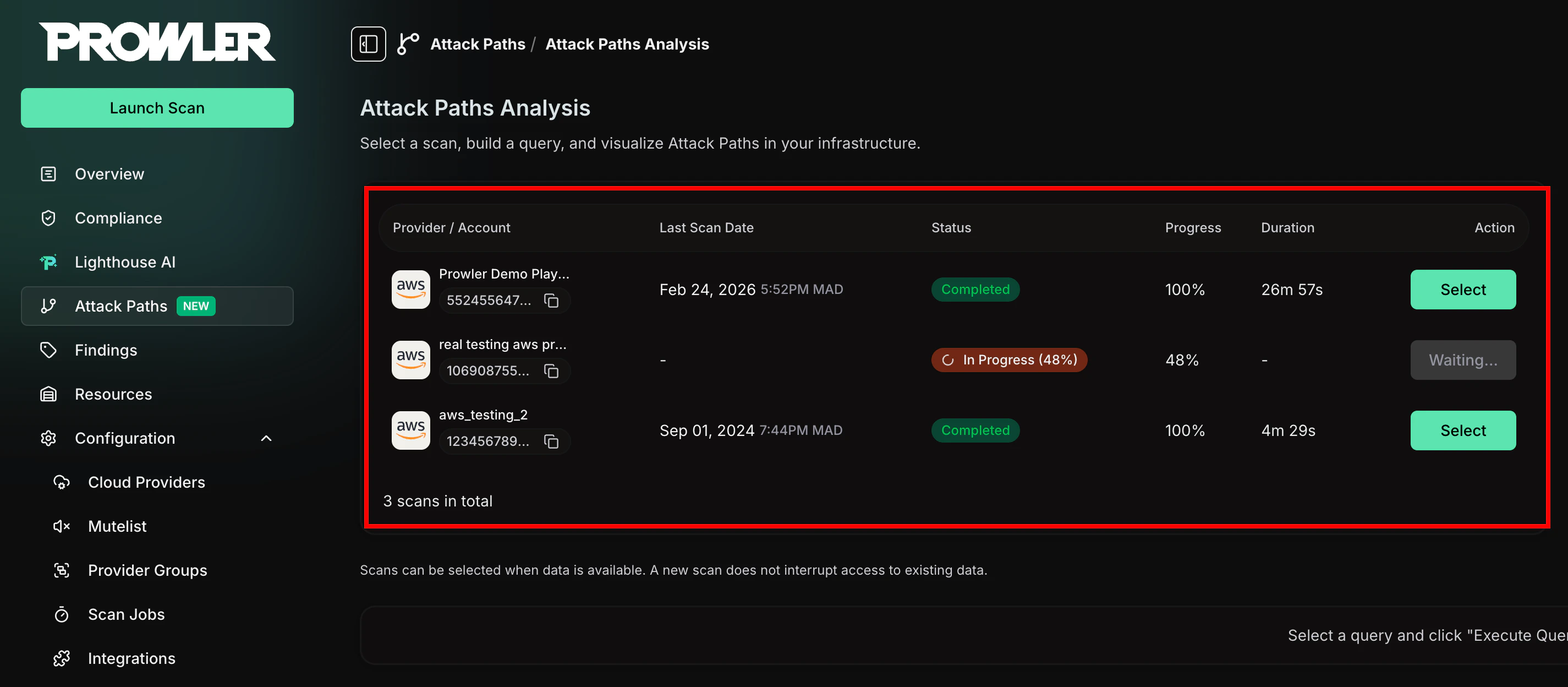
Only scans with a Completed status and ready graph data can be selected.
Scans that are still executing or have failed appear with disabled action
buttons.
Choosing a Query
After selecting a scan, the right panel activates a query dropdown. Each query targets a specific type of privilege escalation or misconfiguration pattern. To choose a query, click the dropdown and select from the available options. Each option displays:- Query name: A descriptive title (e.g., “IAM Privilege Escalation via AssumeRole”)
- Short description: A brief summary of what the query detects
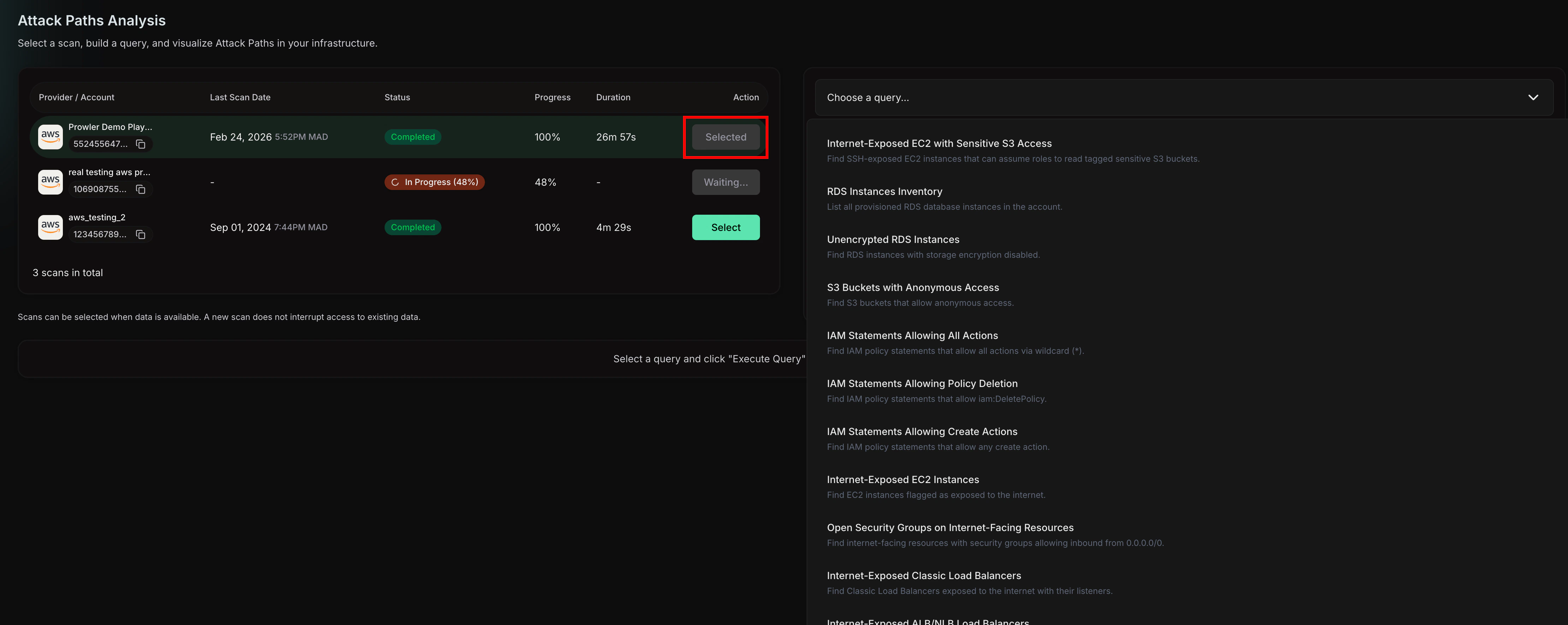
Configuring Query Parameters
Some queries accept optional or required parameters to narrow the scope of the analysis. When a query has parameters, a dynamic form appears below the query description.- Required fields are marked with an asterisk (*) and must be filled before executing
- Optional fields refine the query results but are not mandatory
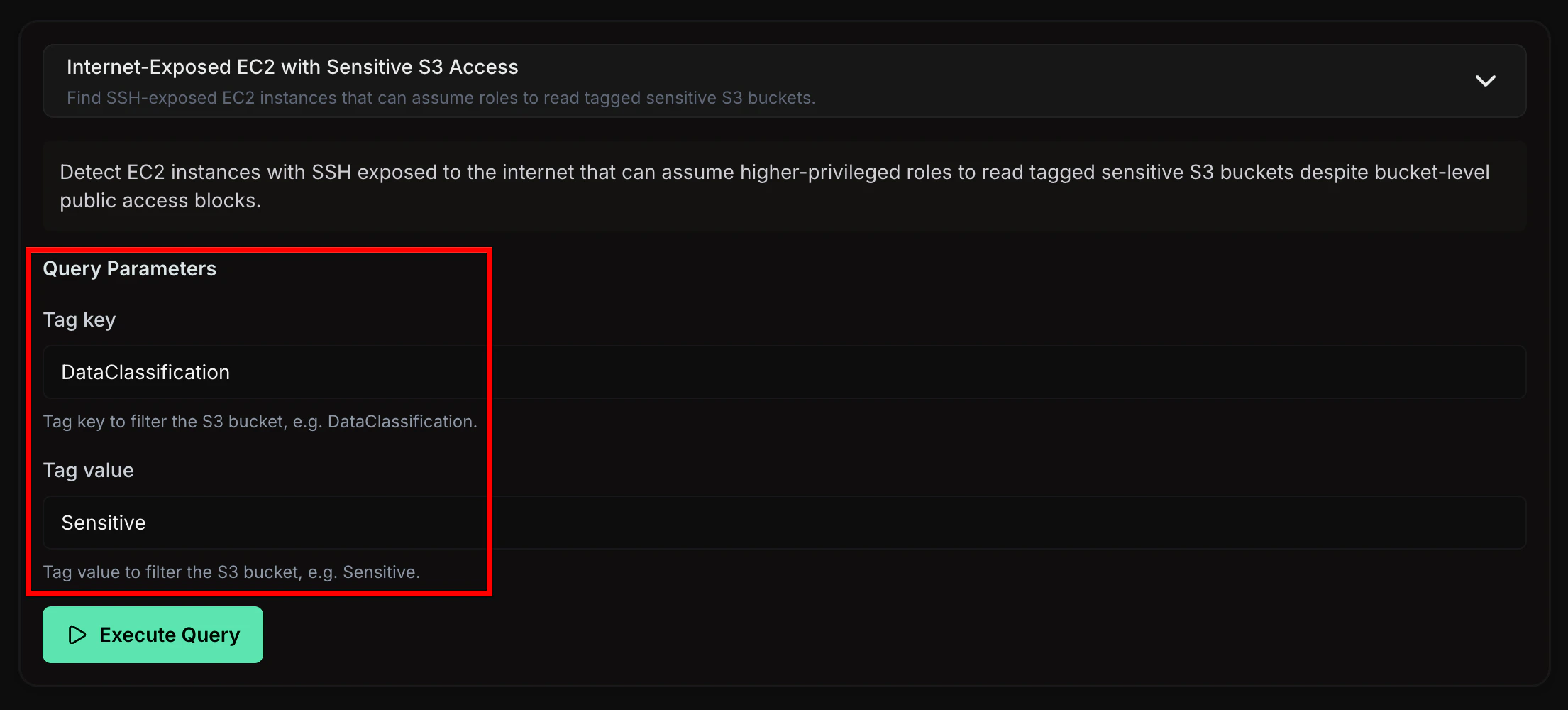
Executing a Query
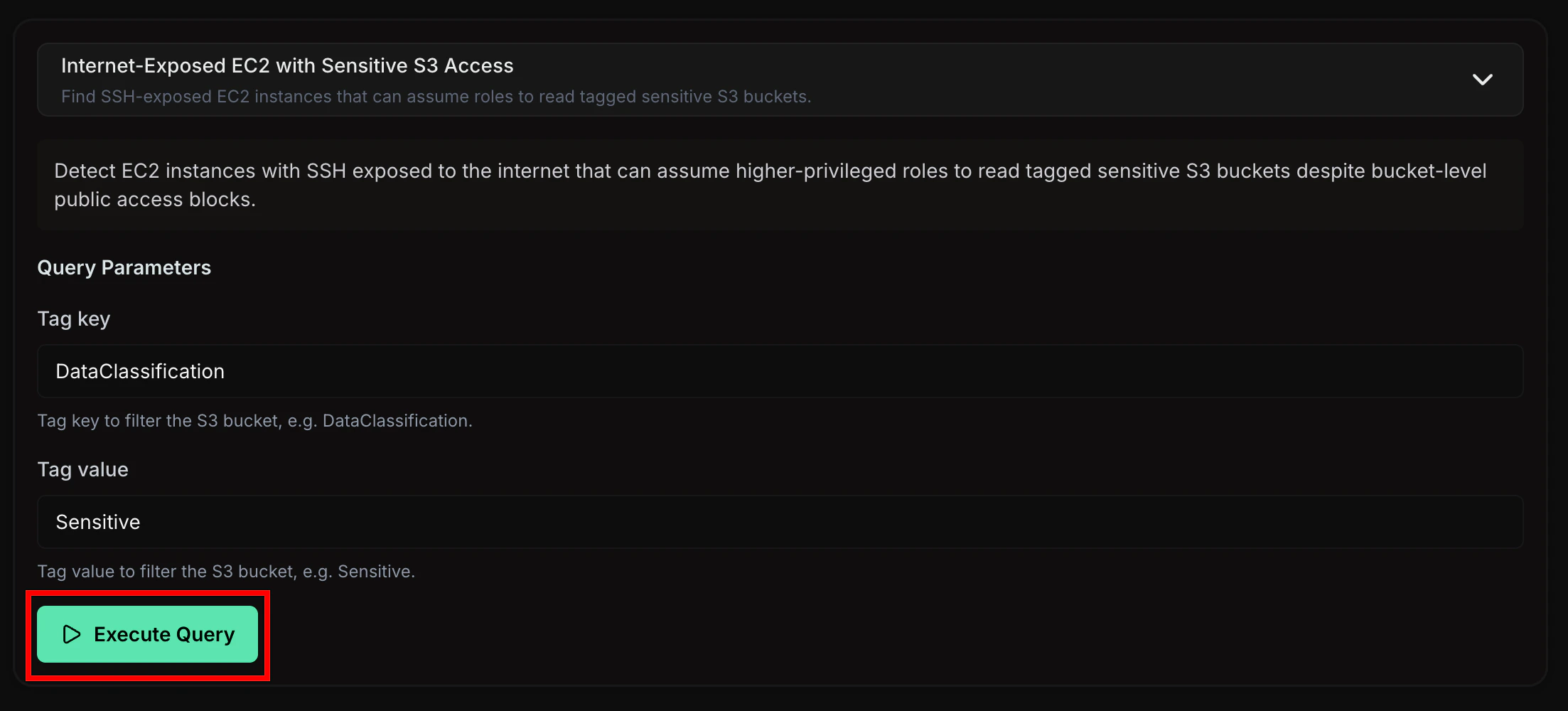
To run the selected query against the scan data, click Execute Query. The button displays a loading state while the query processes. If the query returns no results, an informational message appears. Common reasons include:- No matching patterns found: The scanned environment does not contain the privilege escalation chain the query targets
- Insufficient permissions: The scan credentials may not have captured all the data the query needs
Exploring the Graph
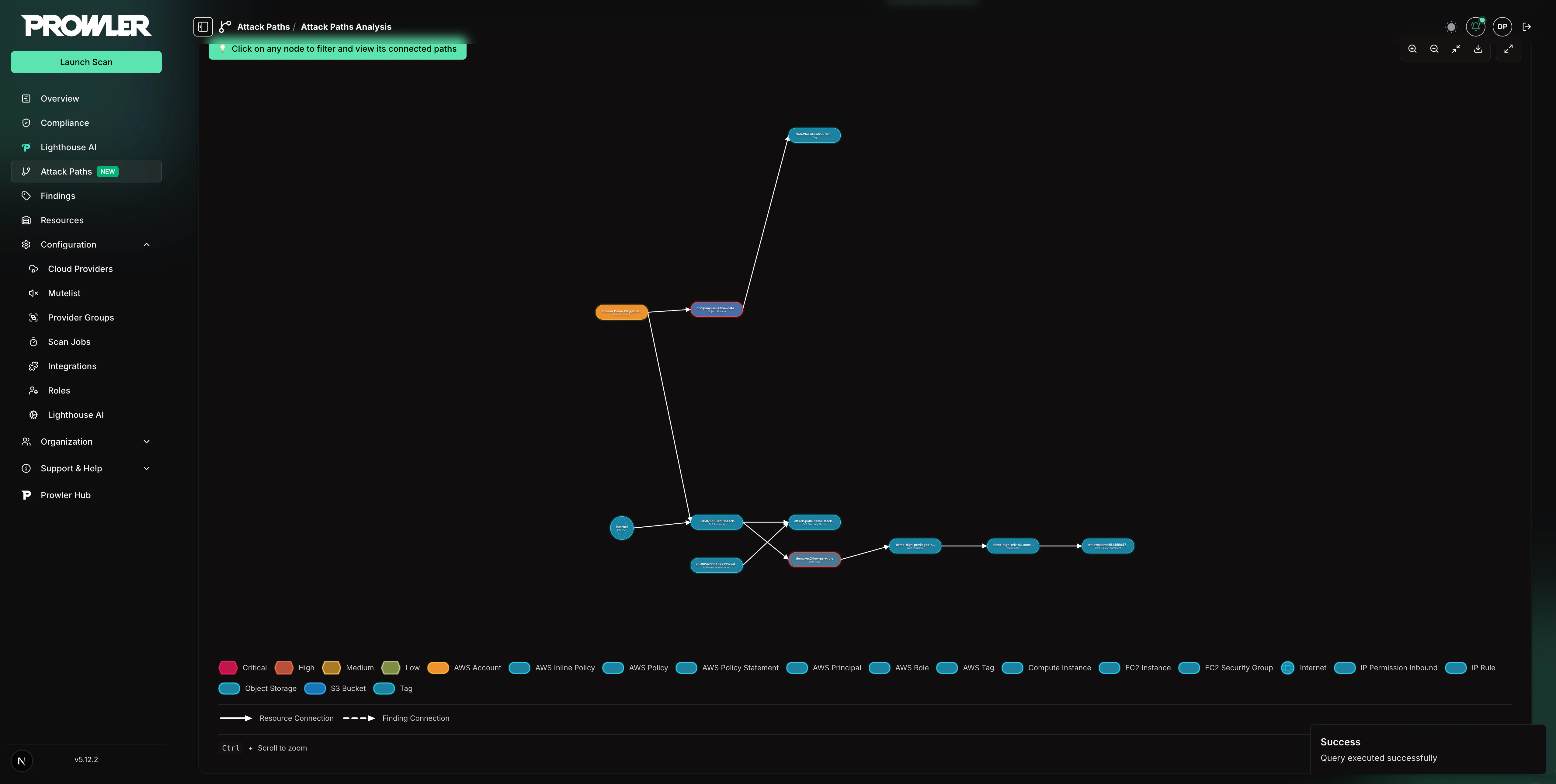
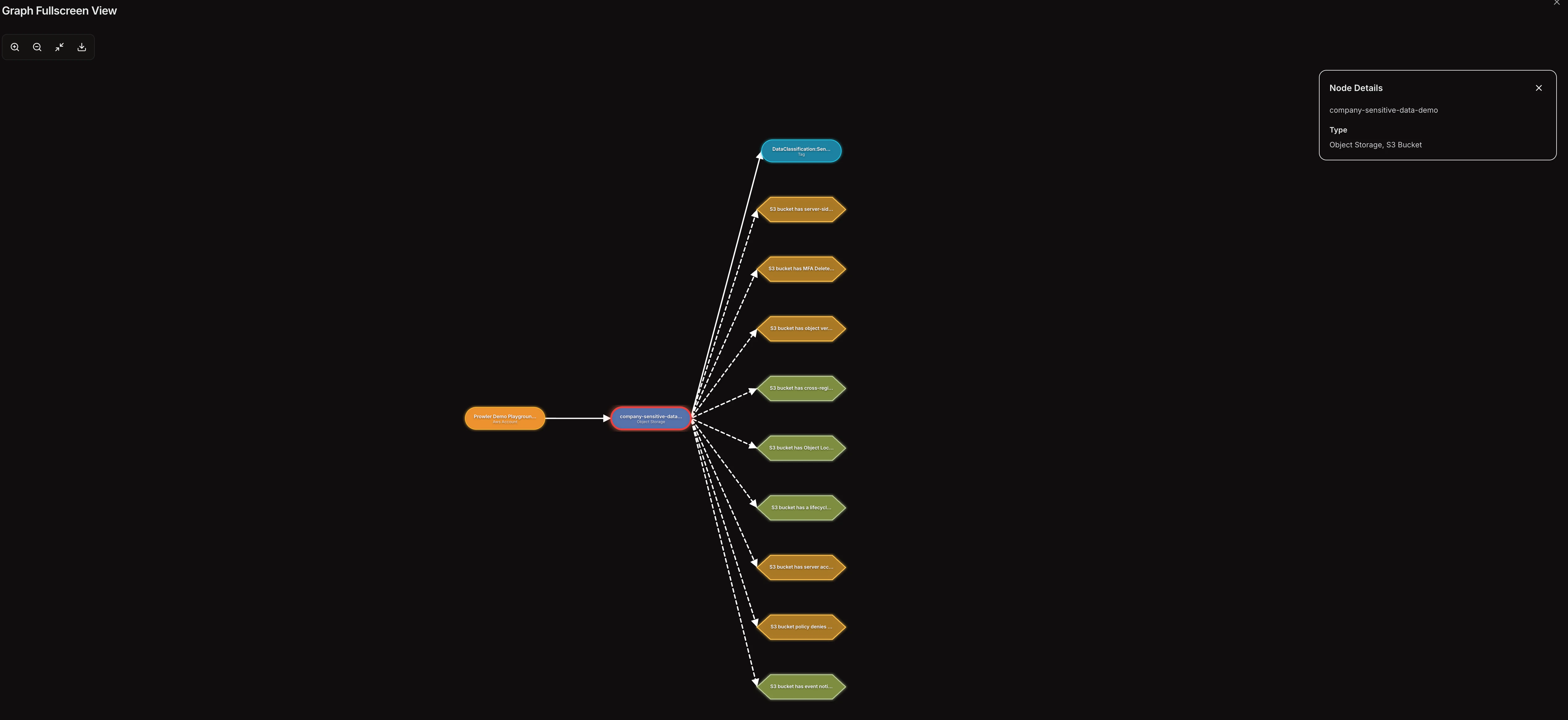
After a successful execution, the graph visualization renders below the query builder in a full-width panel. The graph maps relationships between cloud resources, IAM entities, and security findings.Node Types
- Resource nodes (rounded pills): Represent cloud resources such as IAM roles, policies, EC2 instances, and S3 buckets. Each resource type has a distinct color.
- Finding nodes (hexagons): Represent Prowler security findings linked to resources in the graph. Colors indicate severity level (critical, high, medium, low).
Edge Types
- Solid lines: Direct relationships between resources (e.g., a role attached to a policy)
- Dashed lines: Connections between resources and their associated findings
Interacting with the Graph
Filtering by Node
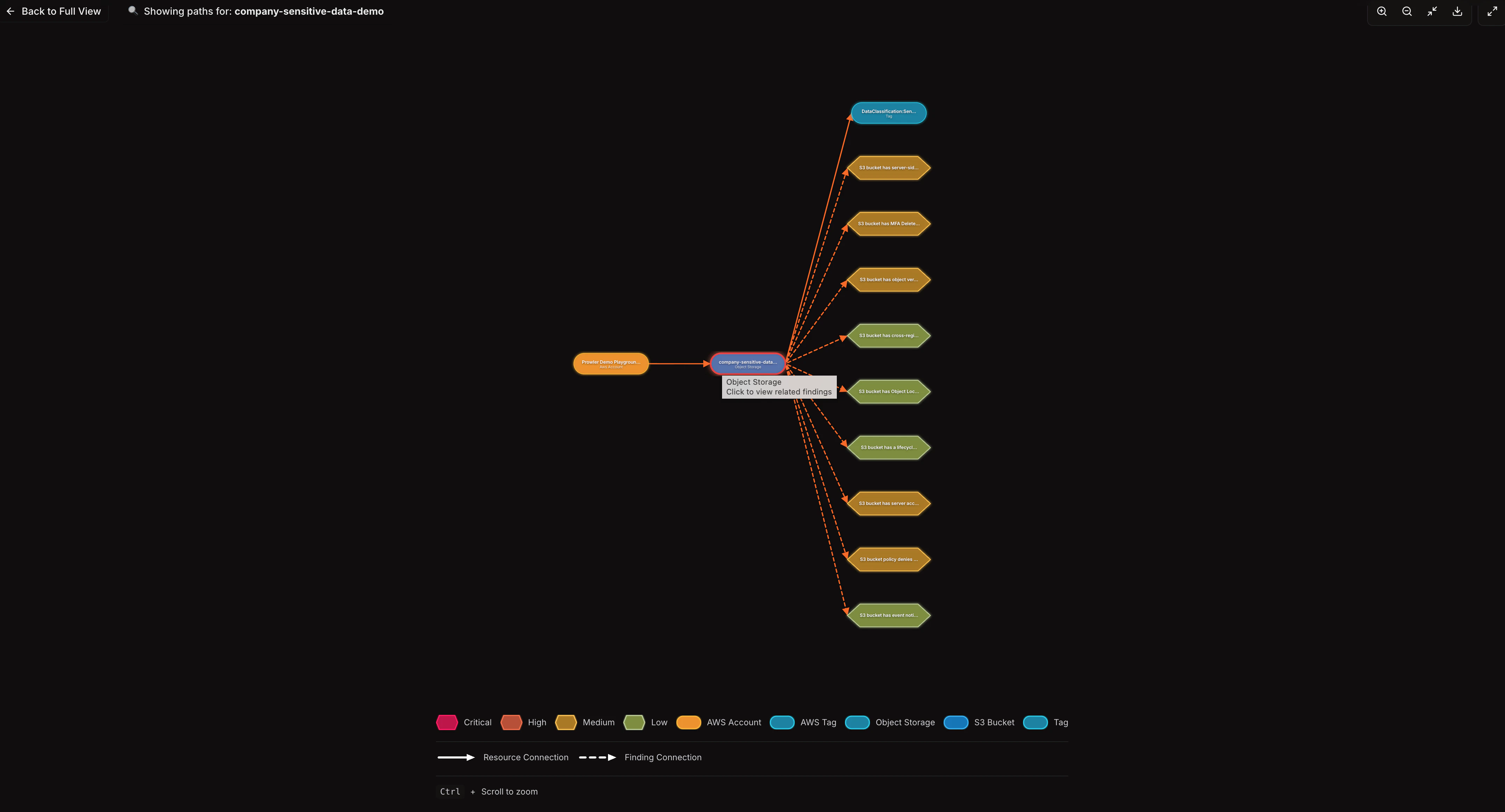
Click any node in the graph to filter the view and display only paths that pass through that node. When a filter is active:- An information banner shows which node is selected
- Click Back to Full View to restore the complete graph
Graph Controls
The toolbar in the top-right corner of the graph provides:- Zoom in / Zoom out: Adjust the zoom level
- Fit to screen: Reset the view to fit all nodes
- Export: Download the current graph as an SVG file
- Fullscreen: Open the graph in a full-screen modal with a side-by-side node detail panel
Use Ctrl + Scroll (or Cmd + Scroll on macOS) to zoom directly within
the graph area.
Viewing Node Details
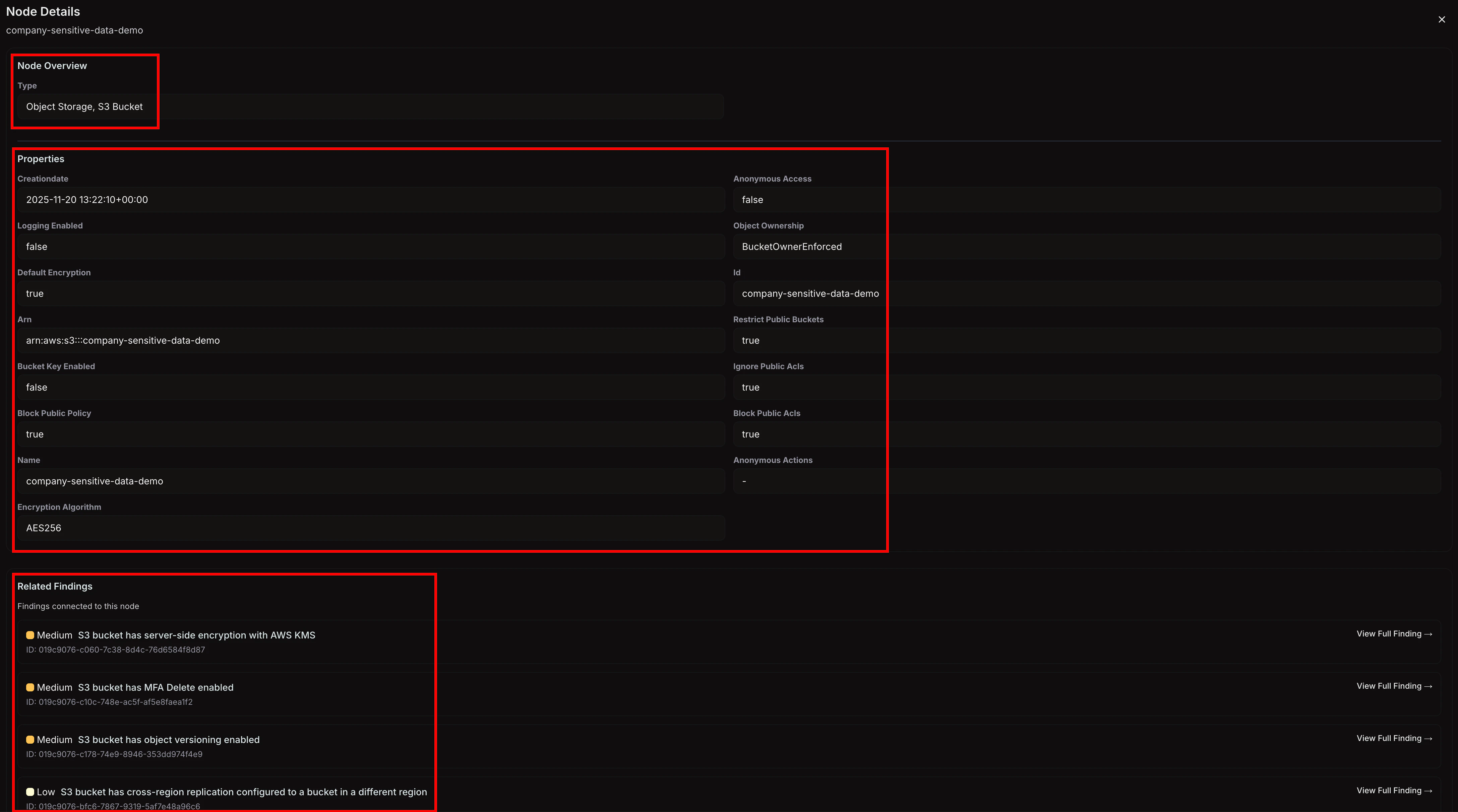
Click any node to open the Node Details panel below the graph. This panel displays:- Node type: The resource category (e.g., “IAM Role,” “EC2 Instance”)
- Properties: All attributes of the selected node, including identifiers, timestamps, and configuration details
- Related findings (for resource nodes): A list of Prowler findings linked to the resource, with severity, title, and status
- Affected resources (for finding nodes): A list of resources associated with the finding
Fullscreen Mode
To expand the graph for detailed exploration, click the fullscreen icon in the graph toolbar. The fullscreen modal provides:- The full graph visualization with all zoom and export controls
- A side panel for node details that appears when a node is selected
- All filtering and interaction capabilities available in the standard view
Using Attack Paths with the MCP Server and Lighthouse AI
Attack Paths capabilities are also available through the Prowler MCP Server, enabling interaction with Attack Paths data via AI assistants like Claude Desktop, Cursor, and other MCP clients. Prowler Lighthouse AI also supports Attack Paths queries, allowing you to analyze privilege escalation chains and security misconfigurations directly from the chat interface. The following MCP tools are available for Attack Paths:prowler_app_list_attack_paths_scans- List and filter Attack Paths scansprowler_app_list_attack_paths_queries- Discover available queries for a completed scanprowler_app_run_attack_paths_query- Execute a query and retrieve graph results with nodes and relationshipsprowler_app_get_attack_paths_cartography_schema- Retrieve the Cartography graph schema for custom openCypher queries
Example Questions
Ask through the MCP Server or Lighthouse AI:- “Find EC2 instances exposed to the internet with access to sensitive S3 buckets”
- “Are there any IAM roles that can escalate their own privileges?”
- “Show me all internet-facing resources with open security groups”
- “Which principals can create Lambda functions with privileged roles?”
- “List all RDS instances with storage encryption disabled”
- “Find S3 buckets that allow anonymous access”
- “Are there any CloudFormation stacks that could be hijacked for privilege escalation?”
- “Show me all roles that can be assumed for lateral movement”
Supported Queries
Attack Paths currently supports the following built-in queries for AWS:Custom Attack Path Queries
| Query | Description |
|---|---|
| Internet-Exposed EC2 with Sensitive S3 Access | Find SSH-exposed EC2 instances that can assume roles to read tagged sensitive S3 buckets |
Basic Resource Queries
| Query | Description |
|---|---|
| RDS Instances Inventory | List all provisioned RDS database instances in the account |
| Unencrypted RDS Instances | Find RDS instances with storage encryption disabled |
| S3 Buckets with Anonymous Access | Find S3 buckets that allow anonymous access |
| IAM Statements Allowing All Actions | Find IAM policy statements that allow all actions via wildcard (*) |
| IAM Statements Allowing Policy Deletion | Find IAM policy statements that allow iam:DeletePolicy |
| IAM Statements Allowing Create Actions | Find IAM policy statements that allow any create action |
Network Exposure Queries
| Query | Description |
|---|---|
| Internet-Exposed EC2 Instances | Find EC2 instances flagged as exposed to the internet |
| Open Security Groups on Internet-Facing Resources | Find internet-facing resources with security groups allowing inbound from 0.0.0.0/0 |
| Internet-Exposed Classic Load Balancers | Find Classic Load Balancers exposed to the internet with their listeners |
| Internet-Exposed ALB/NLB Load Balancers | Find ELBv2 (ALB/NLB) load balancers exposed to the internet with their listeners |
| Resource Lookup by Public IP | Find the AWS resource associated with a given public IP address |
Privilege Escalation Queries
These queries are based on research from pathfinding.cloud by Datadog.| Query | Description |
|---|---|
| App Runner Service Creation with Privileged Role (APPRUNNER-001) | Create an App Runner service with a privileged IAM role to gain its permissions |
| App Runner Service Update for Role Access (APPRUNNER-002) | Update an existing App Runner service to leverage its already-attached privileged role |
| Bedrock Code Interpreter with Privileged Role (BEDROCK-001) | Create a Bedrock AgentCore Code Interpreter with a privileged role attached |
| Bedrock Code Interpreter Session Hijacking (BEDROCK-002) | Start a session on an existing Bedrock code interpreter to exfiltrate its privileged role credentials |
| CloudFormation Stack Creation with Privileged Role (CLOUDFORMATION-001) | Create a CloudFormation stack with a privileged role to provision arbitrary AWS resources |
| CloudFormation Stack Update for Role Access (CLOUDFORMATION-002) | Update an existing CloudFormation stack to leverage its already-attached privileged service role |
| CloudFormation StackSet Creation with Privileged Role (CLOUDFORMATION-003) | Create a CloudFormation StackSet with a privileged execution role to provision arbitrary resources across accounts |
| CloudFormation StackSet Update with Privileged Role (CLOUDFORMATION-004) | Update an existing CloudFormation StackSet to inject malicious resources using a privileged execution role |
| CloudFormation Change Set Privilege Escalation (CLOUDFORMATION-005) | Create and execute a change set on an existing stack to leverage its privileged service role |
| CodeBuild Project Creation with Privileged Role (CODEBUILD-001) | Create a CodeBuild project with a privileged role to execute arbitrary code via a malicious buildspec |
| CodeBuild Buildspec Override for Role Access (CODEBUILD-002) | Start a build on an existing CodeBuild project with a buildspec override to execute code with its privileged role |
| CodeBuild Batch Buildspec Override for Role Access (CODEBUILD-003) | Start a batch build on an existing CodeBuild project with a buildspec override to execute code with its privileged role |
| CodeBuild Batch Project Creation with Privileged Role (CODEBUILD-004) | Create a CodeBuild project configured for batch builds with a privileged role to execute arbitrary code via a malicious buildspec |
| Data Pipeline Creation with Privileged Role (DATAPIPELINE-001) | Create a Data Pipeline with a privileged role to execute arbitrary commands on provisioned infrastructure |
| EC2 Instance Launch with Privileged Role (EC2-001) | Launch EC2 instances with privileged IAM roles to gain their permissions via IMDS |
| EC2 Role Hijacking via UserData Injection (EC2-002) | Inject malicious scripts into EC2 instance userData to gain the attached role’s permissions |
| Spot Instance Launch with Privileged Role (EC2-003) | Launch EC2 Spot Instances with privileged IAM roles to gain their permissions via IMDS |
| Launch Template Poisoning for Role Access (EC2-004) | Inject malicious userData into launch templates that reference privileged roles, no PassRole needed |
| EC2 Instance Connect SSH Access for Role Credentials (EC2INSTANCECONNECT-003) | Push a temporary SSH key to an EC2 instance via Instance Connect to access its attached role credentials through IMDS |
| ECS Service Creation with Privileged Role (ECS-001 - New Cluster) | Create an ECS cluster and service with a privileged Fargate task role to execute arbitrary code |
| ECS Task Execution with Privileged Role (ECS-002 - New Cluster) | Create an ECS cluster and run a one-off Fargate task with a privileged role to execute arbitrary code |
| ECS Service Creation with Privileged Role (ECS-003 - Existing Cluster) | Deploy a Fargate service with a privileged role on an existing ECS cluster |
| ECS Task Execution with Privileged Role (ECS-004 - Existing Cluster) | Run a one-off Fargate task with a privileged role on an existing ECS cluster |
| ECS Task Start with Privileged Role on EC2 (ECS-005 - Existing Cluster) | Register a task definition with a privileged role and start it on an EC2 container instance to execute arbitrary code |
| ECS Exec Container Hijacking for Role Credentials (ECS-006) | Shell into a running ECS container via ECS Exec to steal the attached task role’s credentials |
| Glue Dev Endpoint with Privileged Role (GLUE-001) | Create a Glue development endpoint with a privileged role attached to gain its permissions |
| Glue Dev Endpoint SSH Hijacking via Update (GLUE-002) | Update an existing Glue development endpoint to inject an SSH public key and access its attached role credentials |
| Glue Job Creation with Privileged Role (GLUE-003) | Create a Glue job with a privileged role and start it to execute arbitrary code with that role’s permissions |
| Glue Job Creation with Scheduled Trigger and Privileged Role (GLUE-004) | Create a Glue job with a privileged role and a scheduled trigger to persistently execute arbitrary code |
| Glue Job Hijacking via Update with Privileged Role (GLUE-005) | Update an existing Glue job to attach a privileged role and inject malicious code, then start it to gain that role’s permissions |
| Glue Job Hijacking with Scheduled Trigger and Privileged Role (GLUE-006) | Update an existing Glue job to attach a privileged role and inject malicious code, then create a scheduled trigger for persistent automated execution |
| Policy Version Override for Self-Escalation (IAM-001) | Create a new version of an attached policy with administrative permissions, instantly escalating the principal’s own privileges |
| Access Key Creation for Lateral Movement (IAM-002) | Create access keys for other IAM users to gain their permissions and move laterally across the account |
| Access Key Rotation Attack for Lateral Movement (IAM-003) | Delete and recreate access keys for other IAM users to bypass the two-key limit and gain their permissions |
| Console Login Profile Creation for Lateral Movement (IAM-004) | Create console login profiles for other IAM users to access the AWS Console with their permissions |
| Inline Policy Injection for Self-Escalation (IAM-005) | Attach an inline policy with administrative permissions to your own role, instantly escalating privileges |
| Console Password Override for Lateral Movement (IAM-006) | Change the console password of other IAM users to log in as them and gain their permissions |
| Inline Policy Injection on User for Self-Escalation (IAM-007) | Attach an inline policy with administrative permissions to your own IAM user, instantly escalating privileges |
| Managed Policy Attachment on User for Self-Escalation (IAM-008) | Attach existing managed policies with administrative permissions to your own IAM user, instantly escalating privileges |
| Managed Policy Attachment on Role for Self-Escalation (IAM-009) | Attach existing managed policies with administrative permissions to your own IAM role, instantly escalating privileges |
| Managed Policy Attachment on Group for Self-Escalation (IAM-010) | Attach existing managed policies with administrative permissions to a group you belong to, escalating privileges for all group members |
| Inline Policy Injection on Group for Self-Escalation (IAM-011) | Attach an inline policy with administrative permissions to a group you belong to, escalating privileges for all group members |
| Trust Policy Hijacking for Role Assumption (IAM-012) | Modify a role’s trust policy to allow yourself to assume it, gaining the role’s permissions |
| Group Membership Hijacking for Privilege Escalation (IAM-013) | Add yourself to a privileged IAM group to inherit its permissions, gaining access to all policies attached to the group |
| Managed Policy Attachment with Role Assumption for Lateral Movement (IAM-014) | Attach administrative managed policies to another role you can assume, then assume it to gain elevated privileges |
| Managed Policy Attachment with Access Key Creation for Lateral Movement (IAM-015) | Attach administrative managed policies to another IAM user and create access keys for them to gain programmatic access with elevated privileges |
| Policy Version Override with Role Assumption for Lateral Movement (IAM-016) | Create a new version of a customer-managed policy attached to another role with administrative permissions, then assume that role to gain elevated access |
| Inline Policy Injection with Role Assumption for Lateral Movement (IAM-017) | Attach an inline policy with administrative permissions to another role you can assume, then assume it to gain elevated privileges |
| Inline Policy Injection with Access Key Creation for Lateral Movement (IAM-018) | Attach an inline policy with administrative permissions to another IAM user and create access keys for them to gain programmatic access with elevated privileges |
| Managed Policy Attachment with Trust Policy Hijacking for Privilege Escalation (IAM-019) | Attach administrative managed policies to a role and modify its trust policy to allow yourself to assume it, gaining elevated privileges without prior assume-role access |
| Policy Version Override with Trust Policy Hijacking for Privilege Escalation (IAM-020) | Create a new version of a customer-managed policy attached to a role with administrative permissions and modify its trust policy to assume it, without prior assume-role access |
| Inline Policy Injection with Trust Policy Hijacking for Privilege Escalation (IAM-021) | Add an inline policy with administrative permissions to a role and modify its trust policy to allow yourself to assume it, gaining elevated privileges without prior assume-role access |
| Lambda Function Creation with Privileged Role (LAMBDA-001) | Create a Lambda function with a privileged IAM role and invoke it to execute code with that role’s permissions |
| Lambda Function Creation with Event Source Trigger (LAMBDA-002) | Create a Lambda function with a privileged IAM role and an event source mapping to trigger it automatically, executing code with the role’s permissions |
| Lambda Function Code Injection (LAMBDA-003) | Modify the code of an existing Lambda function to execute arbitrary commands with the function’s execution role permissions |
| Lambda Function Code Injection with Direct Invocation (LAMBDA-004) | Modify the code of an existing Lambda function and invoke it directly to execute arbitrary commands with the function’s execution role permissions |
| Lambda Function Code Injection with Resource Policy Grant (LAMBDA-005) | Modify the code of an existing Lambda function and grant yourself invocation permission via its resource-based policy to execute code with the function’s execution role |
| Lambda Function Creation with Resource Policy Invocation (LAMBDA-006) | Create a Lambda function with a privileged IAM role and grant yourself invocation permission via its resource-based policy to execute code with the role’s permissions |
| SageMaker Notebook Creation with Privileged Role (SAGEMAKER-001) | Create a SageMaker notebook instance with a privileged IAM role to execute arbitrary code with the role’s permissions via the Jupyter environment |
| SageMaker Training Job Creation with Privileged Role (SAGEMAKER-002) | Create a SageMaker training job with a privileged IAM role to execute arbitrary container code with the role’s permissions |
| SageMaker Processing Job Creation with Privileged Role (SAGEMAKER-003) | Create a SageMaker processing job with a privileged IAM role to execute arbitrary container code with the role’s permissions |
| SageMaker Presigned Notebook URL for Privilege Escalation (SAGEMAKER-004) | Generate a presigned URL to access an existing SageMaker notebook instance and execute code with its execution role’s permissions |
| SageMaker Notebook Lifecycle Config Injection (SAGEMAKER-005) | Inject a malicious lifecycle configuration into an existing SageMaker notebook to execute code with the notebook’s execution role during startup |
| SSM Session Access for EC2 Role Credentials (SSM-001) | Start an SSM session on an EC2 instance to access its attached role credentials through IMDS |
| SSM Send Command for EC2 Role Credentials (SSM-002) | Execute commands on an EC2 instance via SSM Run Command to access its attached role credentials through IMDS |
| Role Assumption for Privilege Escalation (STS-001) | Assume IAM roles with elevated permissions by exploiting bidirectional trust between the starting principal and the target role |
- Asking an AI assistant to identify privilege escalation paths in a specific AWS account
- Automating attack path analysis across multiple scans
- Combining attack path data with findings and compliance information for comprehensive security reports